
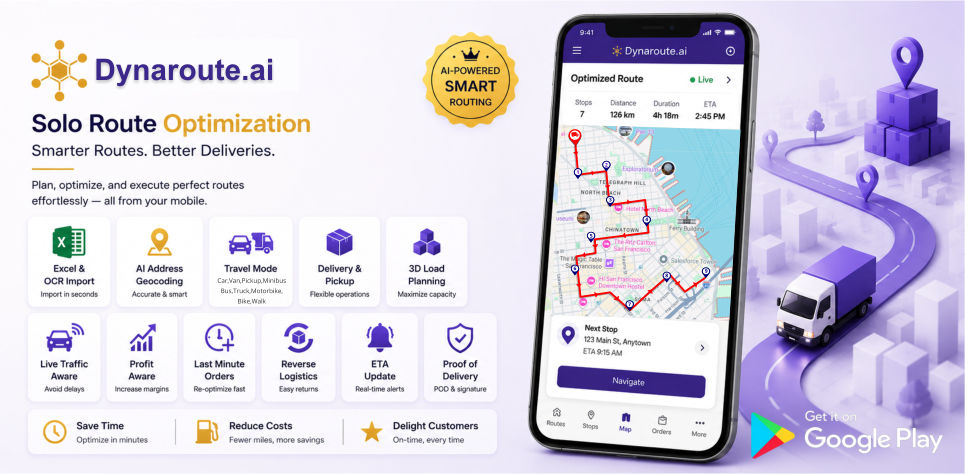
What is Dynaroute.ai?
Dynaroute.ai is an AI-powered mobile solo route optimization and navigation application. In delivery and pickup operations, it analyzes stops, traffic conditions, vehicle capacity, delivery priorities, expected revenue, and operational costs together to create the most efficient and profitable route. It intelligently adds last-minute orders to the existing route, re-optimizes the route when needed, and guides the user with step-by-step navigation. With Dynamic ETA, Excel/OCR import, AI address geocoding, 3D load planning, and KPI reports, it makes route planning faster, more flexible, and measurable.
Dynaroute.ai Core Features
1. Fast Data Import with Excel and OCR
Dynaroute.ai allows users to quickly import stop and address information from Excel files instead of entering it manually. With OCR support, address information from documents, images, or screenshots can also be read and transferred into the system. This feature speeds up the route preparation process and reduces data entry errors.
2. AI Address Geocoding and Location Mapping
The AI Geocoding feature helps convert entered addresses into accurate locations on the map. It interprets incomplete, incorrect, or differently formatted addresses and makes them suitable for route planning. This makes it easier to place stops at the correct locations.
3. Stop Editing and Stop Grouping
Users can edit, update, and group stops according to operational needs. With the Stop Grouping feature, stops in the same area, with the same priority, or with similar operation types can be grouped together. This makes route planning more controlled and easier to manage.
4. AI-Powered Route Optimization
Dynaroute.ai creates optimized routes by arranging stops in the most efficient order. It considers traffic, distance, time, stop sequence, priorities, and operational costs, helping users move faster and more efficiently.
5. Unlimited Re-optimization and Route Recalculation
Users can perform unlimited re-optimization and route recalculation throughout the day using the same stops. When a new need arises, the stop order changes, or the operation plan is updated, users can re-optimize their routes.
6. Traffic-Aware Routing
The AI Traffic-Aware Routing feature includes traffic conditions in route planning. This means the route is shaped not only by distance, but also by road congestion and estimated travel time. This feature helps reduce delays and enables more realistic planning.
7. Dynamic ETA
The Dynamic ETA feature keeps estimated arrival times updated throughout the route. When traffic, route changes, or re-optimization occur, the ETA is recalculated. Users can track the operation process with more accurate timing information.
8. Mobile Navigation
Dynaroute.ai turns the optimized route into navigation through the mobile app. Users can receive step-by-step guidance along the generated route. This brings route planning and field execution together in a single mobile experience.
9. Multiple Travel Modes
The application supports use cases for car, van, bicycle, motorcycle, and walking. The Pro plan also includes Truck Mode. This allows route planning to be more accurate based on the selected vehicle type.
10. Truck Mode
Truck Mode, available in the Pro Plan, helps create route plans suitable for trucks and larger vehicles. It supports more appropriate route generation based on vehicle type and operational needs.
11. Capacity Planning
The Capacity Planning feature allows vehicle capacity to be considered in delivery and pickup operations. The amount of load that can be carried in the vehicle, as well as items to be delivered and picked up, are included in the route planning process. This helps prevent capacity overload and inefficient loading.
12. 3D Load Planning
3D Load Planning helps place loads inside the vehicle more efficiently. By considering volume, capacity, and load arrangement, it makes not only routing but also the loading process more organized.
13. Delivery & Pickup Management
Dynaroute.ai supports managing delivery and pickup points on the same route. Users can plan more clearly at which stop a delivery will be made and at which stop an item will be picked up. This feature makes route flow more understandable, especially in mixed operations.
14. Last-Minute Order Management
New orders that arrive during the operation can be added to the existing route. The application evaluates the new stop according to the current route structure and re-optimizes the route when needed. This allows real-time changes to be managed without disrupting the operation.
15. Priority-Based Routing
With Priority-Based Routing, importance or urgency levels can be assigned to stops. Higher-priority deliveries or time-sensitive stops can be placed earlier in the route planning process. This allows routes to be created based not only on the shortest distance, but also on business priorities.
16. Segmentation-Based Routing
The Segmentation Routing feature helps divide routes by region, customer type, operation type, or stop groups. This enables more organized, readable, and manageable route plans.
17. Profit-Aware Routing
Profit-Aware Routing considers not only distance and time, but also profitability in route planning. Expected revenue, operational cost, route efficiency, and stop priorities are evaluated together to support more profit-focused routing decisions.
18. Route Preferences and Avoidance Options
Users can choose to avoid highways, toll roads, and ferries on the route. This allows the route to be shaped not only by the fastest path, but also by the user’s cost preferences and operational needs.
19. Curb Approach
The Curb Approach feature helps the vehicle approach the stop from the correct direction and side of the road. This provides a safer and more practical field experience in operations where delivery, pickup, and curbside access are important.
20. Reverse Routes
The Reverse Routes feature allows an existing route to be used in the opposite direction. It provides convenience for return operations, reverse pickup processes, or situations where the same route needs to be managed in the opposite direction.
21. Proof of Delivery with POD and Digital Signature
The Proof of Delivery feature is used to verify that a delivery has been completed. At the end of the delivery, users can record a signature, delivery status, or proof of delivery information. This makes customer confirmation, operation tracking, and post-delivery verification processes more reliable.
22. KPI Reports
The KPI Reports feature helps measure route and operational performance. Metrics such as completed routes, number of stops, time usage, delays, delivery performance, cost, and efficiency can be reported. This makes operations more measurable and easier to improve.
23. Monthly Stop Capacity
The Basic Plan supports up to 4,500 total stops per month. The Pro Plan supports up to 6,000 total stops per month. This capacity refers to the total number of stops the user can plan throughout the month.
24. Plan Options
The Basic Plan includes core route optimization, traffic-aware routing, data import, capacity planning, 3D load planning, dynamic ETA, re-optimization, profit-aware routing, POD, and KPI reports. The Pro Plan includes all Basic features, plus a higher monthly stop capacity and Truck Mode support.
Benefits
Higher Revenue Per Visit
-
Thanks to smart routing and visit scheduling, 15–30% more customer visits in the same amount of time
-
Priority assignment to high-potential customers & pharmacies/doctors
-
Sales representative time is spent on visits that convert to sales.
20–35% Savings on Fuel and Travel Costs
-
The shortest and most logical routes based on traffic, distance, and stop density
-
Unnecessary kilometers are automatically eliminated
-
The problem of repeatedly circling the same area is eliminated.
Time Savings = Lower Personnel Costs
-
Manual planning and Excel processes are eliminated 100%
-
Planning time is reduced from hours to minutes
-
Operations & sales managers focus on strategy.
Visit the Right Customer at the Right Frequency
-
ABC customer segmentation
-
Automatic visit frequency planning (weekly, monthly, campaign-based)
-
Critical doctors, pharmacies, or retailers are never skipped.
Preventing Wasted Visits
-
Visits that do not generate sales, are repetitive, or are unnecessary are automatically filtered out
-
Routes with low performance are flagged by the system
CO₂ Emission Reduces
-
Shorter routes → lower carbon emissions
-
Measurable impact in ESG & sustainability reports
Real-time KPI and Performance Tracking
-
Individual/region/team-based performance
-
Cost per visit
-
Revenue per km
Low cost prices
-
The most economical software compared to its competitors.
-
Unlimited addresses, users, and routes.
References


Testimonials